Real-Time Order Tracking: The Logistics Trust Baseline
Customers now expect live order status and a reliable way to manage delivery windows. Here is what poor visibility costs and what a tracking module needs.
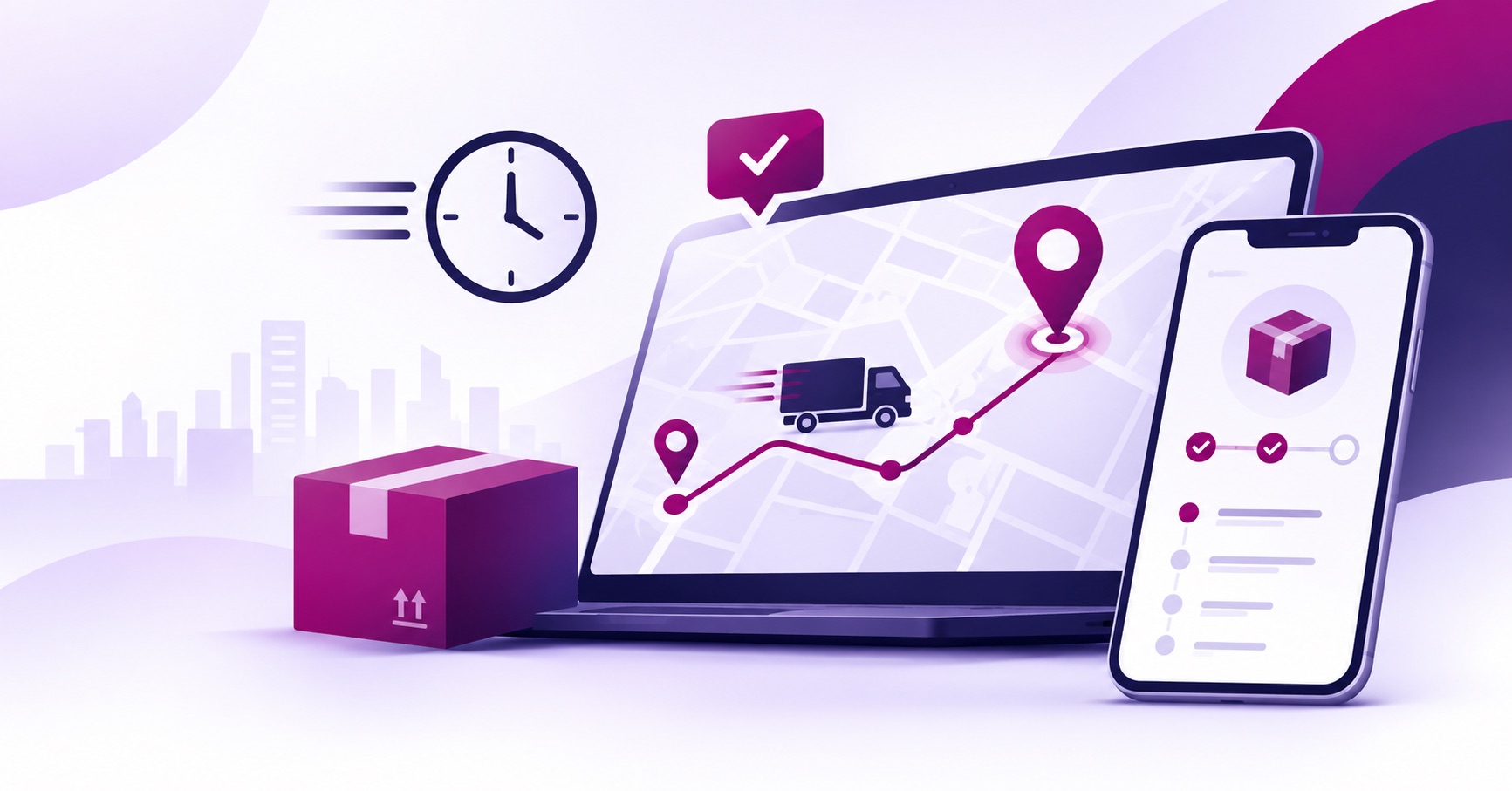
Real-time order tracking gives customers live visibility into where their order or shipment stands. Paired with callback scheduling, a clear way to confirm or change a delivery window or book the confirmation call, it lets customers manage their delivery without chasing anyone for an answer. It has moved from a differentiator to the baseline expectation that decides whether a logistics brand keeps a customer’s trust. The businesses that hold that trust are the ones that keep customers informed before they have to ask, whether the update comes from a live tracking screen, a proactive notification, or a coordinator who calls the day before.
E-commerce trained customers to expect a live map or a status bar for almost anything they order, and logistics, moving, freight, and field-service companies are now measured against the same standard. Below, we look at why tracking became non-negotiable, what poor visibility costs, what customers of a real moving company say they value, and what a tracking and callback-scheduling module needs to do well.
Why real-time tracking became the trust baseline
Customers no longer treat tracking as optional, and the research is consistent on this point. In a July 2024 survey of 1,310 US consumers, last-mile software company Bettermile found that 89% consider parcel visibility essential for planning their daily schedules, and nearly 75% would choose a retailer based on its ability to provide parcel tracking and shorter delivery windows (Post & Parcel, 2024). Visibility now shapes where people buy, not only how they feel after they have bought.
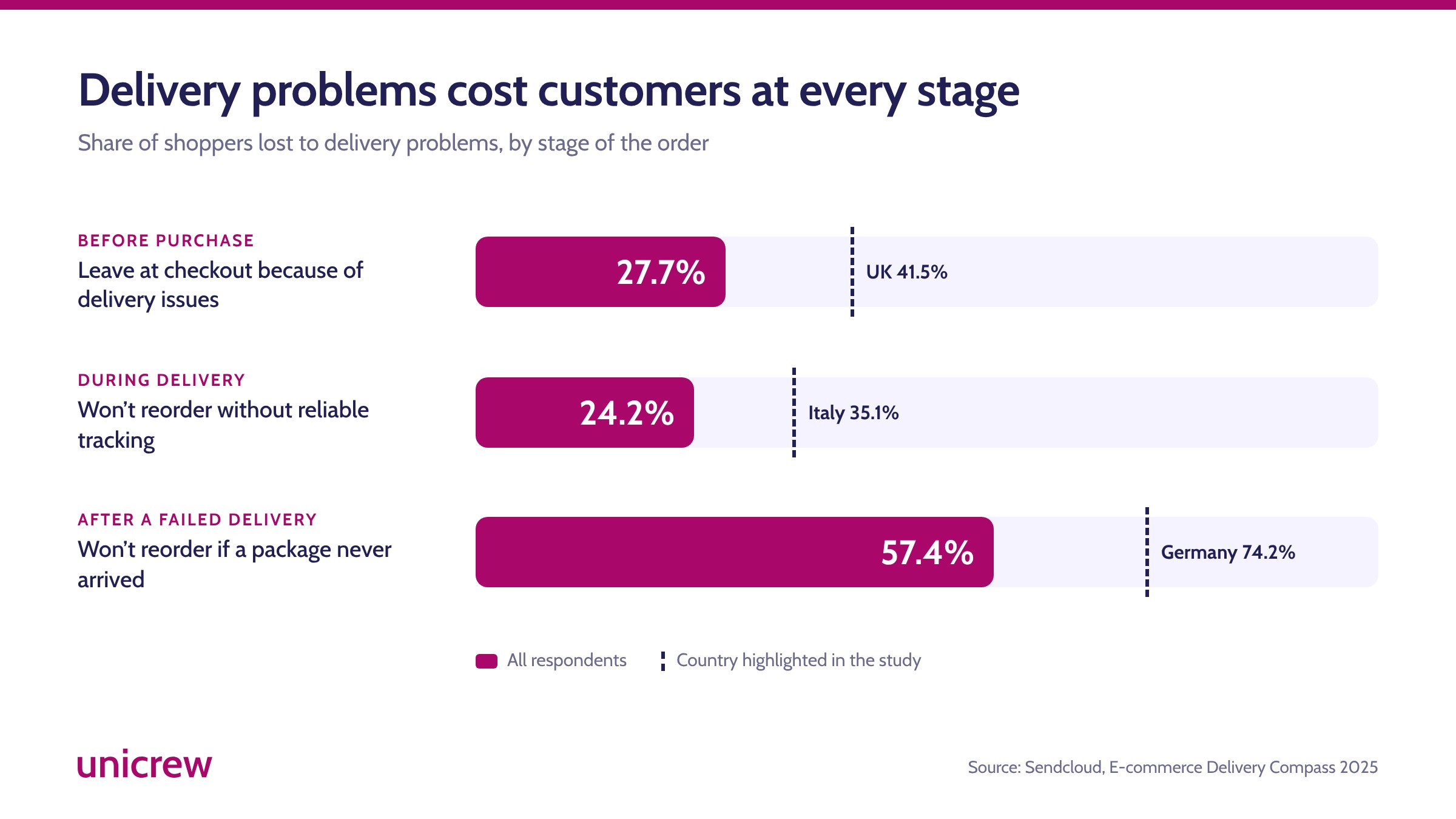
Sendcloud’s 2025 consumer research, based on insights from 8,000 consumers across eight European countries, shows what happens when tracking falls short. According to the study, 24.24% of consumers refuse to reorder if reliable tracking is not available, and the share rises to 35.1% in Italy and 31.3% in France (Sendcloud, 2025). Over 80% of shoppers in the same research expect immediate notifications about delivery delays, and over half say they have experienced fragmented or missing updates. Customers judge tracking less on whether it exists and more on whether it is current, specific, and delivered without them having to go looking for it.
What “real-time” actually means
“Real-time” does not require millisecond latency. It means the gap between an event happening (a shipment leaving a facility, a crew confirming an arrival window) and that event showing up in the customer’s view is measured in seconds or minutes, never in “whenever the next batch job runs.” A system that updates once overnight is a daily snapshot dressed up as a live dashboard, and customers notice the first time they check a status that turns out to be stale.
Tracking expectations have spread beyond e-commerce
The expectation that started with parcel delivery has spread to home services, furniture delivery, freight, and moving, where the live map a customer saw on a recent online order becomes the reference point. For moving and freight operators, that expectation carries extra weight. A parcel that arrives a few hours late is an inconvenience. A crew that shows up during a window nobody confirmed is an operational failure customers remember and describe to other people.
What losing visibility actually costs you
The cost of poor tracking rarely shows up on a line item labeled “tracking.” It shows up in support costs and lost repeat business, and the wider delivery experience decides sales at checkout too.
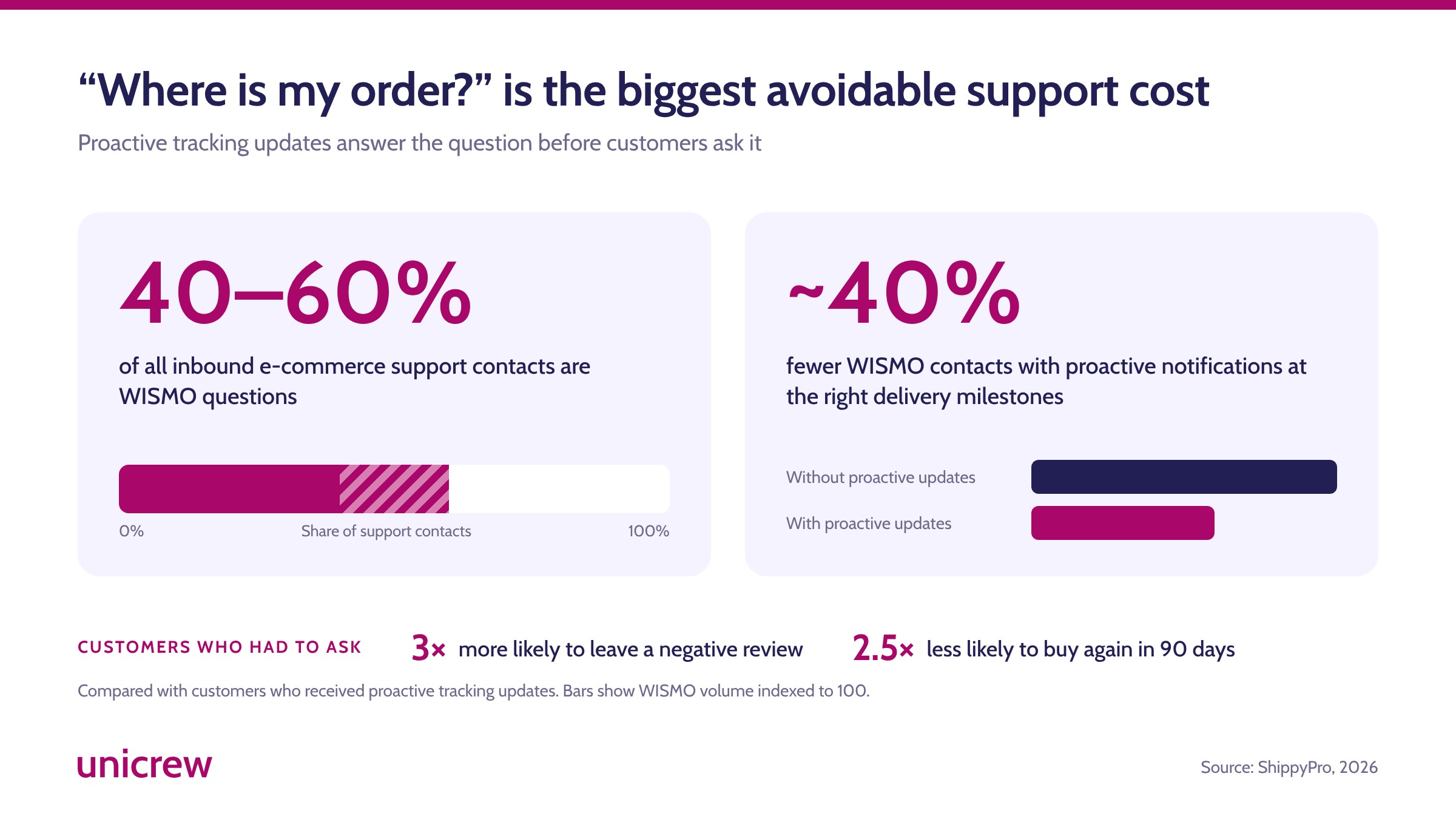
Start with support volume. ShippyPro’s 2026 analysis puts “where is my order” (WISMO) contacts at 40% to 60% of all inbound e-commerce support contacts, with each contact costing between £4.50 and £8.00 to handle, phone contacts costing more and live chat less (ShippyPro, 2026). At 500 such contacts a week, the same analysis estimates a direct cost of between £117,000 and £208,000 a year spent answering a question that proactive updates would have answered on their own. It also finds that customers who contact support about order status are 3× more likely to leave a negative review and 2.5× less likely to make a repeat purchase within 90 days than customers who received proactive tracking updates.
The damage starts before an order is even placed. Sendcloud’s research found that delivery issues drive 27.7% of customers away at checkout globally, a number that rises to 41.5% in the UK and 36.9% in France (Sendcloud, 2025). After shipping, the stakes rise further: 57.44% of customers in the same research would not reorder if their package never arrived, a figure that reaches 74.2% in Germany. In other words, delivery decides sales at checkout and repeat orders after it, alongside price and product.
Moving businesses feel a sharper version of this cost. An unclear callback window can mean a crew arriving without a confirmed freight elevator reservation, or a customer who took the day off for a window that was never locked in. Each of those failures lands on a single, high-stakes day for the customer, which makes it far harder to recover from than a late parcel.
What customers remember about a delivery
When customers describe a move that went well, they rarely mention a tracking screen. They talk about knowing what would happen and when, being able to change their order without friction, and arriving at the end with no surprises. Reviews of MiniMoves, Inc., a US moving company we have worked with since 2015, show the pattern clearly. They are a good guide to what any tracking or self-service feature is ultimately for.
Proactive communication builds confidence
The most common theme is communication that arrives before the customer has to ask for it. One customer who moved from Dallas to Chicago wrote, in a review published on the MiniMoves, Inc. testimonials page, that their coordinator “was in constant communication about paperwork, necessary logistics for the movers, and accurate timelines.” The same customer added: “The shipment arrived early on according to the estimated delivery window,” and said they “had plenty of notice as to the timeframe of their arrival.”
Another customer, Rosemary H., who moved from Atlanta to the Chicago area, put it this way in a Google review: “customer service was always available for tracking and questions making the entire process easy.” Anthony S., in a September 2025 review, said “The payment and delivery logistics and contacts were also exceptionally smooth and well executed.”
None of these customers describe a dashboard. They describe being kept informed by people who had the right information at the right time, which only works when the people giving updates and the systems behind them share accurate, current data.
Self-service inventory gives customers control
The second theme is control over the order itself, delivered through a mix of online tools and responsive people. Darryl W. wrote in a BBB review: “Easy to work with when adding and deleting inventory. With a proper inventory we actually saved money - no up charge.” Gregory T., in a review, pointed to “the way the website detailed a quick and useful inventory to get you a fast and reliable estimate in no time flat.” Sara T., moving from Boston to the DC area, noted in a Google review that the move coordinator was “very easy to reach to update my inventory.”
For a moving company, the inventory is the order: it sets the price, the truck space, and the crew’s plan. Letting customers enter and adjust it themselves removes a whole category of back-and-forth calls.
Accurate expectations prevent surprises
The third theme is accuracy. Kathryn L. wrote in an April 2026 BBB review: “They gave me a quote based on number and size of boxes, plus my bicycle, and there were no surprises, no hidden fees, just great service.” Sara T. was “pleasantly surprised that my items arrived in 6 days, which was less than the 1-3 week range that I was provided up front.” Mary D., a repeat customer, wrote in an August 2025 review that the crews “arrived on time all three moves,” and Jost K. summed up the move in a BBB review in a handful of words: “Super professional - On time - Very knowledgeable and friendly - on time - easiest move we ever had.”
Trust in this category comes from a promise that holds, and any tracking screen, notification, or phone call is only as valuable as the accuracy of the data behind it.
What a tracking and callback-scheduling module requires
Beyond a tracking number
A tracking number that resolves to a static “shipped” page no longer meets the bar. Customers expect a live status: where the order is right now, what happens next, and when, answered correctly every time they check.
That requires granular, timestamped states such as “confirmed,” “scheduled,” “in transit,” “delayed,” and “delivered.” Getting this right is a data modeling problem before it is a design problem: the system needs an authoritative definition of each status and a reliable way to know when an order moves between them.
Where each status and ETA comes from
Every status a customer sees has to be produced by a real event, captured as close to the work as possible. In practice, that means a few sources feeding one order record:
- Field and driver apps. The crew or driver marks arrival, loading, departure and delivery on a mobile app, ideally with a timestamp, location and photo attached, so the status is recorded at the moment it happens rather than typed in later.
- Scans at facilities. Barcode or RFID scans at a warehouse, depot or cross-dock record when goods move between stages.
- Carrier feeds. When a third party carries part of the journey, its status arrives through the carrier’s API or EDI messages (EDI 214 is the standard shipment status message) and has to be mapped onto your own status definitions.
- GPS from your own fleet. Vehicle telematics or the driver app’s location supplies position for live maps and for updating arrival estimates.
The ETA is a calculation, not a status. It typically starts from the planned route and schedule, then updates as live position, completed stops and traffic come in. Showing customers a window rather than an exact minute keeps the promise honest, and the useful rule is simple: when a recalculated ETA moves outside the window the customer was given, that change should trigger a notification and, for appointment-based work, an offer to reschedule.
Callback scheduling is the other half
For any business where delivery involves coordination (an appointment window, a crew arriving at a specific time), tracking alone covers only half the job. Customers also need a clear, reliable way to see and confirm that appointment. In this guide, callback scheduling means both sides of that: the customer choosing, confirming or changing their delivery or arrival window, and booking the confirmation call the team makes before a crew arrives, all against one shared calendar. A callback-scheduling capability next to live status does two things at once: it gives the customer control over a moment that affects their day, and it removes a recurring category of inbound call from the operations team’s queue.
Done well, the two features reinforce each other and cut both “where is it” and “can we move it” calls. Built as disconnected features, they leave customers calling in to check that the two agree.
Proactive notifications
Status should reach the customer without requiring them to open an app or a browser tab. Proactive notifications by SMS, email, or messaging app, sent at meaningful milestones rather than at every minor internal state change, turn a tracking page from something customers have to check into something that reaches them. ShippyPro’s 2026 analysis found that proactive multi-channel notifications reduce WISMO contacts by approximately 40% when sent at the right delivery milestones (ShippyPro, 2026). A tracking page nobody is told to visit does little to reduce support load on its own.
Different customers, different levels of visibility
Not every customer segment needs the same tracking experience at the same time. A corporate account relocating employees on a schedule, with a coordinator managing dozens of moves, has different needs from a household making one move a year. The first benefits from live status and reporting across many orders. The second often values a reliable timeline and a person who calls ahead. Designing the module so visibility can be switched on per segment, starting where it carries the most operational value, is a sound way to roll it out without overloading the systems behind it.
Case in point: MiniMoves, Inc.
MiniMoves, Inc. is a US-based national small-shipment moving company serving local, state-to-state, and international moves. Our work with the company centers on its order management platform, a custom web application with a React frontend and an ASP.NET backend.
An internal system that absorbs growth
The core of the platform is the internal order management system. It serves the sales, customer service, and operations departments at MiniMoves, Inc., so the people who quote moves, answer customer questions, and coordinate crews all work from the same order data. Accurate timelines and advance notice, the things the reviews above praise, depend on exactly that kind of shared record.
The business outcome is the one Jeff Sides, then CFO and VP of IT at MiniMoves, Inc., described in his 2022 Clutch review of our work on the system: the enhancements “increased productivity and allowed us to maintain double digit growth without a substantial increase in staffing.” Much of that value sits behind the scenes, in the order management system the team relies on every day.
Self-service, rolled out in stages
On the customer side, the company is introducing self-service step by step. Today, customers can enter and update their inventory online. Quoting and booking stay with the sales team, who turn the customer’s inventory into a binding price quote. The self-service tool has not been fully launched yet, so full online quotes and online booking are not part of it today.
Real-time tracking where it matters most
Real-time tracking is available to some corporate clients of MiniMoves, Inc., and is not part of the consumer experience. Household customers get their visibility through people: a customer service team that is available for questions and a team that confirms arrival windows ahead of time. This combination of selective real-time tracking for corporate accounts and proactive personal communication for consumers mirrors the segmented, phased approach described above. It also illustrates a general rule: the internal system has to be right first, because every customer-facing channel, human or digital, depends on it.
Where off-the-shelf tracking tools fall short
Generic tracking widgets are built for a parcel moving through a carrier network toward a fixed address, with updates from the carrier’s API. That suits standard e-commerce. It suits moving companies, appointment-based freight, and field service poorly, because their customers want to know when the crew arrives, what is on their order, and how to change it.
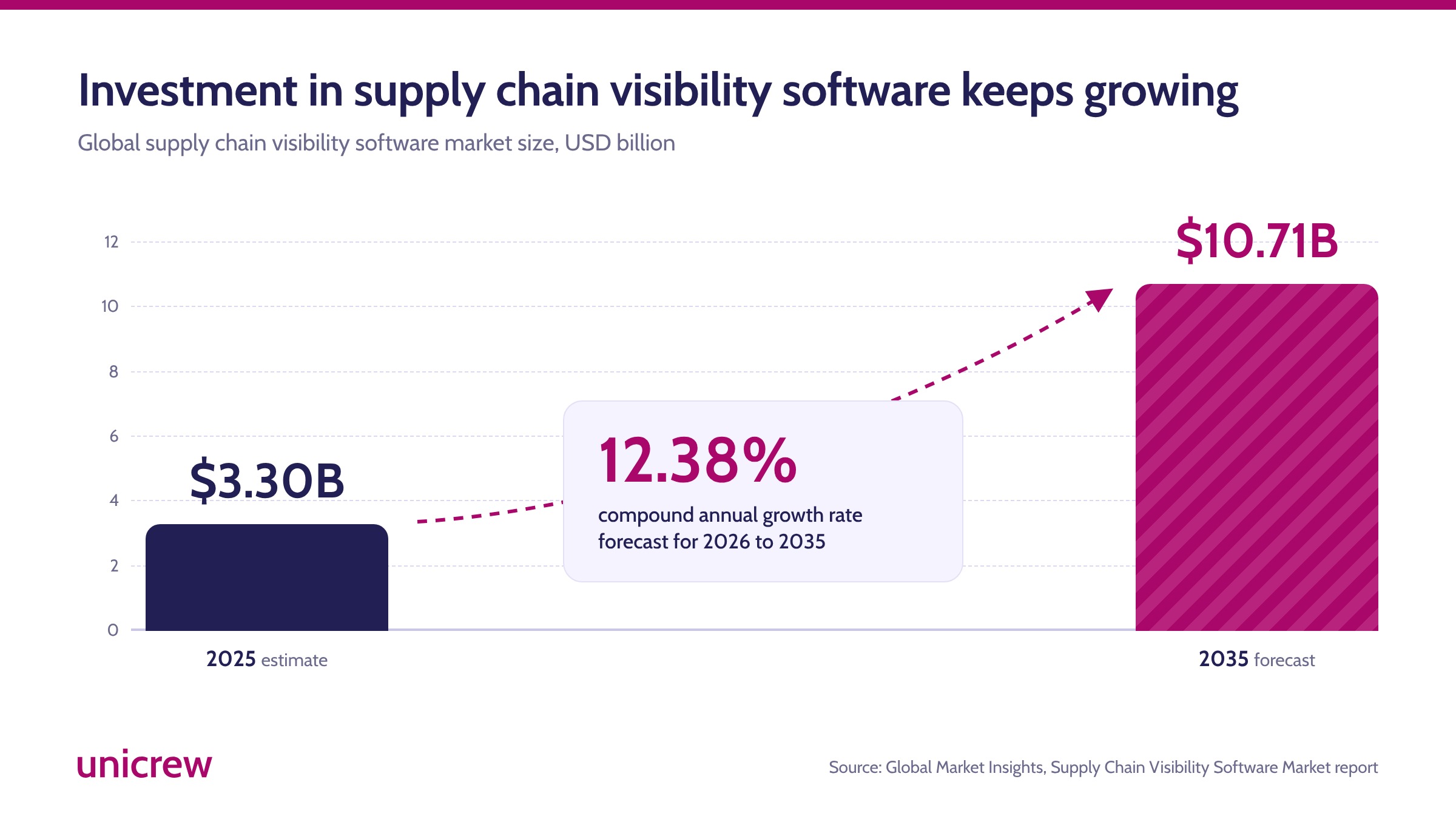
Demand for visibility is not in question. Global Market Insights valued the supply chain visibility software market at USD 3.30 billion in 2025 and forecasts it to reach USD 10.71 billion by 2035, a CAGR of 12.38% for 2026 to 2035 (Global Market Insights). The question for a specialized operator is not whether to invest in visibility but in what. For operators whose delivery model does not map onto “package leaves warehouse, package arrives,” a packaged widget often ends up customized so heavily that it stops being off-the-shelf while keeping the licensing and integration constraints of a packaged product.
What counts is whether the logic that matters to the business (appointment windows, callback rules, inventory editing rights, segment-specific visibility) fits a generic tool cleanly or needs to be built around how the business runs. We cover that decision in more depth in our guides to custom software versus off-the-shelf and how to build custom supply chain software.
Adding tracking to systems you already run
Tracking accuracy is only as good as the systems feeding it, and this is the part of a tracking project that customers never see but that determines whether the feature works at all. Before adding a tracking widget or a callback-scheduling screen, check whether order data, dispatch data, and scheduling data agree with each other across the systems that hold them. A tracking display that shows a status pulled from a system nobody updates in real time is worse than no display at all, because it actively misleads the customer.
That integration layer, rather than the visual tracker, is usually where a tracking project succeeds or stalls. It is also why we approach this kind of work as an assessment first: understand what is already there, integrate and modernize it, automate the manual steps people still do by hand, then add predictive or AI-driven features once the underlying data supports them. It is the same approach behind our supply chain optimization work more broadly.
In practice, a tracking project usually starts with questions that have nothing to do with maps or notifications. Which system is the authoritative source of truth for order status? How often does dispatch data sync with it? When a customer changes an appointment, how quickly do the other systems reflect it? A status update that only propagates on an overnight batch job will show customers stale information for most of the day, which defeats the purpose of calling it real-time.
A phased rollout works better than a big-bang launch for exactly this reason. Turning tracking on for one segment first, such as corporate accounts, and checking that the statuses shown match what dispatch knows to be true catches data-sync problems while the impact is still small, and gives the support team time to confirm that status calls are dropping.
Common pitfalls when rolling out real-time tracking
Treating tracking as a UI feature instead of an integration project. A polished tracking screen backed by stale data teaches customers that the information cannot be relied on, and they go back to calling.
Leaving callback and scheduling logic for later. Tracking answers “where is it.” Callback scheduling answers “what do I need to do about it.” Building the first without the second still leaves the customer picking up the phone, which is the behavior driving the support costs discussed earlier.
Underestimating how many systems need to agree. Order management, dispatch, scheduling, and sometimes a separate CRM or billing system all need to reflect the same status at close to the same time. Each additional system is another place tracking can silently break, and the failure is rarely a visible error. Usually a status quietly stops updating.
Forgetting the people who still give updates. Even with self-service in place, many customers will call or expect a call. If the coordinator on the phone sees different data from what the customer sees online, trust breaks in both channels. Internal tools deserve the same accuracy standard as the customer-facing view.
Not measuring the follow-through. A gain like the approximately 40% drop in status contacts that ShippyPro reports only shows up if a business tracks support contact rate before and after launch. Shipping the feature and never measuring its effect on support load leaves the return on the project invisible to the people who approved the budget.
Building for the demo, not the edge case. Tracking that works when everything is on time is the easy part. Customers decide whether to trust it based on how clearly it handles a delayed callback or a rescheduled window. Silence or a stale timestamp in that moment does more damage than the delay itself.
Where unicrew fits
We build tracking, scheduling, and order management software for operators whose delivery model does not fit a generic carrier widget. Our transportation and logistics work covers customer-facing tools, internal order management, and the integration layer that keeps them consistent. That work ranges from field apps where dealers update job statuses to our long-running work on the platform for MiniMoves, Inc.
A typical engagement starts with an assessment of the systems you already run: where order, dispatch, and scheduling data live, how they sync, and which customer segment would benefit most from live visibility first. From there, our platforms development and integration team connects those systems, and our business process automation work removes the manual steps that slow status updates down. Most engagements start within two to four weeks, and our QA practice includes ISTQB-certified engineers, which matters for a feature whose value depends on being right every time a customer checks. If you are planning a tracking or self-service rollout, tell us about your project.
Key takeaways
- Tracking is now a baseline expectation. 89% of US consumers in Bettermile’s 2024 survey consider parcel visibility essential for planning their day, and poor visibility shows up as support volume and lost repeat business.
- Customers value being informed, not a specific screen. In reviews of MiniMoves, Inc., customers credit coordinators and crews with accurate timelines and advance notice, and credit both the website and responsive staff with making it simple to build and update an inventory.
- Visibility and control belong together. Tracking without scheduling or order editing still leaves customers reaching for the phone.
- Roll out in stages. Starting live tracking with the segment that gains the most, such as corporate accounts, lets you validate data quality before scaling.
- The internal system comes first. At MiniMoves, Inc., the internal order management system helped the company maintain double-digit growth without a substantial increase in staffing. Any customer-facing update is only as accurate as the internal data behind it.
Frequently asked questions
Real-time order tracking is a system that shows customers the current, live status of their order or shipment, updated within seconds or minutes of each change, instead of a static confirmation page or a tracking number that does not reflect what is happening. In logistics and moving, it usually includes timestamped statuses, proactive notifications, and visibility into appointment or delivery windows.
It removes the guesswork that erodes trust. When customers can see accurate status, or receive it proactively, they stop calling for reassurance. Sendcloud's 2025 research found that 24.24% of consumers refuse to reorder when reliable tracking is not available, so accurate, consistently updated tracking directly supports repeat business.
It gives customers a clear, reliable view of their delivery or callback window and a defined way to confirm or change it, rather than waiting to hear from dispatch. That improves the customer experience and reduces the manual coordination work on the operations side, especially when scheduling and tracking share the same data.
The difficulty depends less on the tracking display and more on whether the underlying systems (order management, dispatch, and scheduling) share consistent data. Platforms with fragmented data typically need integration work first. A phased rollout, starting with one customer segment, helps catch data-sync issues before the feature reaches every customer.
It depends on how closely the delivery model matches standard parcel shipping. Off-the-shelf tools work well for simple parcel shipping. Operators with appointment windows, callback scheduling, inventory editing, or segment-specific visibility often find that a packaged tool needs so much customization that a purpose-built module becomes the more reliable path.
Not necessarily. Corporate clients managing many relocations often gain the most from live tracking and reporting, while household customers frequently value an accurate timeline and a coordinator who confirms arrival windows. A sound approach is to start with the segment where live tracking delivers the most value and expand from there.