
Case study Modernization
unicrew.com: our WordPress to Astro migration
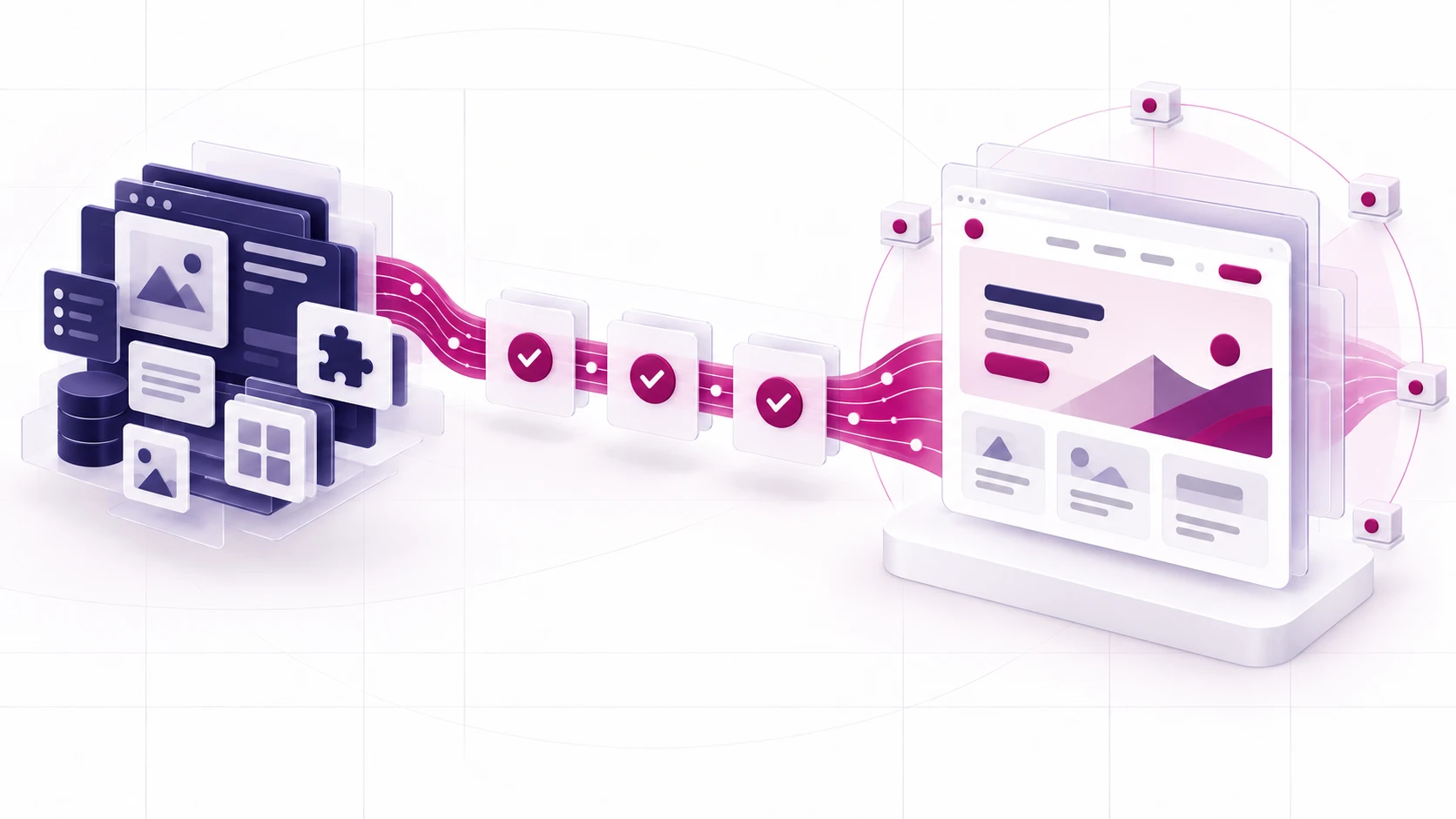
The site you are reading. Built in under 30 days from a 26-plugin WordPress install onto Astro and Cloudflare Workers, then carried across with every one of its 478 URLs accounted for.
We rebuilt unicrew.com, the site you are reading, from a 26-plugin WordPress install into a static Astro site on Cloudflare Workers. The build took under 30 days. The WordPress to Astro migration then carried all 478 of the old URLs across as promises to keep, grew the technology catalogue from 13 indexed pages to 79, and cut over on 16 September 2026.
- Focus
- Modernization
- Market
- Global
- Engagement
- unicrew's own site, full rebuild and cutover
- Year
- 2026
- Stack
 Astro
Astro Cloudflare
 TypeScript
 WordPress
 JavaScript
Outcome at a glance
What this project delivered, in numbers.
- 478URLs carried acrossevery one reconciled before cutover
- Under 30 daysTo build the sitefully native on day six, four section hubs redesigned by day 27
- 13 to 79Technology pages indexed52 written from placeholders, 14 added new
- ~60 secondsFrom merge to liveon every change to the main branch
Why Astro
unicrew.com had done its job on WordPress for a decade. Then the job changed.
For most of that decade a marketing site had one audience: a person, arriving from a search result, reading with their eyes. Answer engines are now a second audience, and they read very differently. They reward clean structure, complete metadata and content they can quote without guessing.
Meeting that bar means controlling exactly what every page puts out, and a plugin-composed CMS is built for something else: flexibility, one plugin at a time. Ours was doing what WordPress does well: twenty-six plugins, each handling a real job, from forms, SEO and redirects (two plugins, side by side) to caching, image optimisation, security, backups and consent. Each on its own release schedule, each with a say in how a page gets produced. Change one thing everywhere and you discover there is no one place to change it.
There was a quieter second problem. Of our 65 technology pages, 52 were placeholders, correctly kept out of search until someone wrote them. Writing them properly was a content programme, and a content programme wants a content model underneath it. A page builder is the wrong tool for that.
We build software for a living, and moving other companies off platforms they have outgrown is part of that living. It was time to take our own advice.
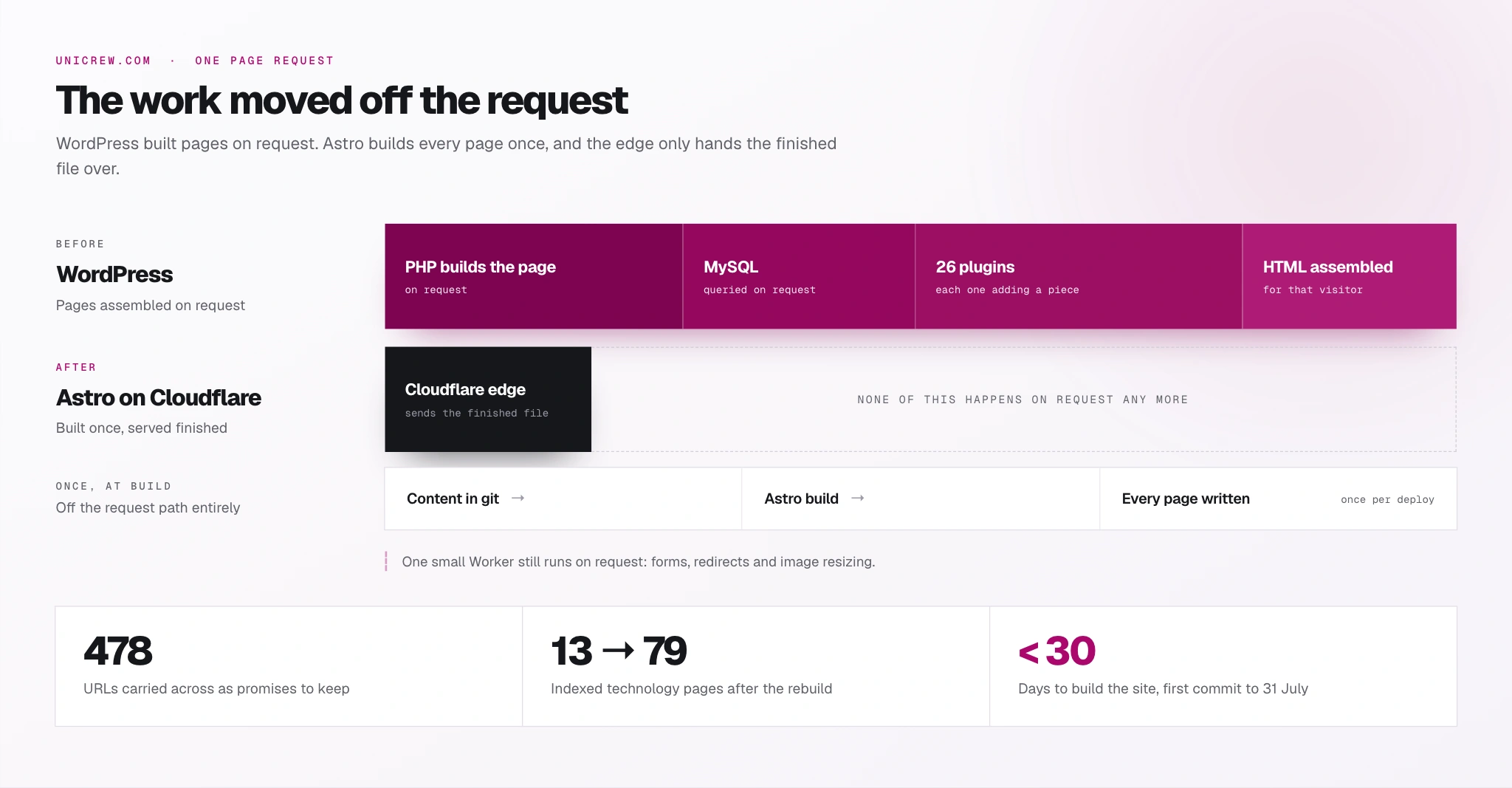
We chose Astro, a framework that builds the whole site into plain HTML ahead of time, and Cloudflare Workers to serve it from the edge.
The case for Astro came down to three things we could check:
-
No JavaScript by default.
A page ships none to the browser unless we add it, so it costs a reader nothing to run.
-
Every page is typed content.
One place decides what every page on the site says about itself to search engines and AI assistants.
-
The whole site builds in seconds.
So every change gets checked in full, and nobody waits.
Cloudflare needed no debate. Our domain already lived there, so switching over became a routing change, with rollback one DNS revert away. Every branch gets a preview URL for free. The only part of the site that still runs code when a visitor arrives is a small Worker, which handles our forms, our redirects and image resizing.
We gave something up for this, knowingly. There is no admin panel, so publishing a page means a pull request and a build. Content lives in files, with a review on every change. And nothing is live until CI passes, which is slower than clicking Update and exactly the point. For a team that already lives in git and publishes a few times a week, that is a good trade: every change to the site is read by a second person, versioned, and reversible in one click. For a newsroom, it would be the wrong one.
Under the hood: where the plugins’ jobs went
The eight jobs the plugins used to do all still get done, in more predictable places:
-
Forms: the Worker.
-
SEO metadata and structured data: computed at build time from the content itself.
-
Redirects: rules that same Worker applies at the edge.
-
Caching: the edge itself.
-
Image resizing: that Worker again, on demand, at the size each screen needs.
-
Backups: the git history.
-
Consent: a small script we own.
-
Security: a far smaller surface. No admin login to phish, no PHP running when a page is requested.
Every URL, every word
A URL is a promise: search engines, other people’s links and a decade of citations all point at addresses chosen years ago, and none of that is ours to renegotiate for the convenience of a redesign. All 478 old URLs were catalogued before a single page was designed, and every one is accounted for today.
Three moves kept the promise:
-
Catalogue first.
All 478 URLs and their metadata, exported before design began.
-
One redirect map.
Two plugins had been managing redirects side by side; we reconciled their rules into one map and carried every existing rule forward. Where the rebuild deliberately retired a thin page, the old address got a rule pointing at what replaced it. The map holds 210 rules today, and a check confirms on every build that each one lands somewhere real.
-
A human on every URL change.
Changing a published URL requires a person to approve it. That sounds like ceremony for a company website. It is the single control that kept a fast rebuild from spending an asset that took ten years to earn.
An address is only worth keeping if what it points at is still there, so ten years of writing came across too, without anyone retyping a word of it.
The temptation in a migration is to convert everything into the new system’s native format. We kept the original markup, because conversion is where content quietly changes shape. Every one of the 140 published posts was lifted out of a pristine copy of the production database exactly as WordPress had saved it, with its address, dates, author, categories and tags untouched. Most still run on that saved markup today; the handful we have rewritten since, we rewrote on purpose, as content work. The metadata came across the same way: the titles and descriptions search engines had been indexing for years, captured as the exact strings they had always been, so that every later change to them was a decision.
Cleanup happens at build time, gently and predictably:
-
The old “In this article” widget: gone. The template’s own chapter rail does that job now, on any post with enough headings to need one.
-
Stray inline formatting: trimmed back to a short allowlist.
-
Images: wired into the responsive pipeline, so the edge can resize them.
-
Anchors: headings without one get one, and every existing anchor stays exactly where it was, because an anchor is a link someone may already have shared.
Under the hood: why a plain function beats a parser here
The build-time cleanup is a plain function over the saved HTML. Before writing it, we measured every assumption it makes across the whole corpus, all 1,704 inline style attributes included, and froze those measurements into tests. If a future post ever breaks one of them, a test fails loudly and the page stays right. A parser was available only as a transitive dependency of the build tooling, and a build that leans on another package’s dependency tree is a build that breaks on an unrelated upgrade.
Built with Claude Code
We built the site with Claude Code. The interesting part is what we put in front of it, because that is what made AI-written code safe to ship.
Nothing an agent produces reaches the site until it has passed a validation chain of 33 steps, covering everything from link resolution to structured data to heading order, and then two reviews that judge the work itself. One asks whether a page is genuinely persuasive against the pages it has to beat; the other checks every hard claim against the evidence in the repository. A page ships only when both say yes. Every agent works inside a task-scoped brief that names the files it may touch and the checks it must pass, and anything touching URLs, tracking or schema hits a hard stop and waits for a person.
The discipline that makes the chain worth having is doubting the chain. Our Turnstile check follows the script tag into the built HTML to prove a widget actually renders. The link check resolves every href against the real build. And seventeen scripts exist for one purpose: to break a check deliberately and prove it goes red. A green light nobody has ever seen turn red only tells you the light works.
Results
The site changed platforms without spending the asset it exists to protect, and it came out better built than it went in.
-
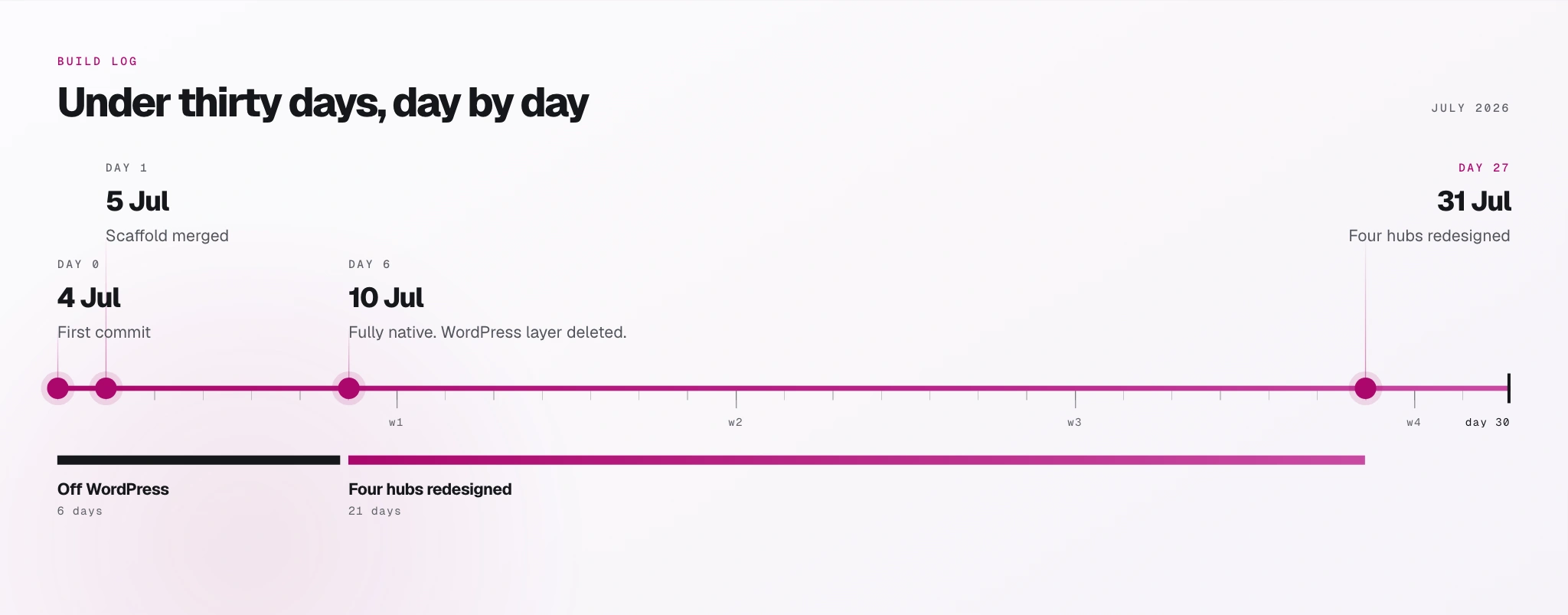
Built in under 30 days.
Fully native six days after the first commit, and the technologies, blog, solutions and industries hubs redesigned by 31 July. The weeks after went on the remaining templates, content, redirects, checks and launch, and we cut over on 16 September.
-
Every change to what pages say about themselves was deliberate.
All 299 metadata differences against the old site trace to a documented improvement, and none is a regression.
-
No layout shift on the routes we measured.
A Lighthouse run in September measured a cumulative layout shift of zero on the routes sampled, and a mobile audit found no image on the site that could shift the layout while loading.
-
The media library halved.
From 242 MB to 105 MB, once we let the edge resize images on demand and stopped storing every size ourselves.
What changed day to day is smaller than any of those numbers and matters more. Nobody logs into an admin panel any more. A content change is a diff, so a second person reads it before it goes live, it can be reverted in one action, and six months from now we can read the commit and know why it was made. Something we merge is live in about a minute. A twenty-six-plugin install can break itself at 3am; this site cannot, because nothing here changes without a person merging it.
If you are on WordPress
We did this to ourselves, on a live site with ten years of search history riding on it, with the same method we use when a client asks us to move a platform they cannot afford to break:
-
Catalogue the URLs first: every address and its metadata, before any design work starts.
-
Decide what is genuinely dynamic: usually a form or two. Everything else can be static.
-
Put the risky steps behind a rollback: one you can execute in a single move, such as a DNS revert.
-
Build the safety net before the pages: the checks should exist before the content they will judge.
Two of the things that made it hold here travel well: a redirect map nobody can change without a human approving the diff, and seventeen scripts whose only job is to break a check and prove it goes red.
A migration like this starts with two exports from your current site, your URL inventory and your existing metadata, and those two files decide the shape of everything that follows. Most engagements start within two to four weeks, and run as time and materials, as a fixed price against a defined outcome, or as a team extension billed per person per month. Which one fits depends mostly on how clearly the finish line is drawn on day one. And cutover is the start of the next phase: the same checks that gated the rebuild keep gating every change afterwards, and if you would rather we ran that for you, that is what our software maintenance and support work is for.
It is not for everyone, and part of the job is knowing that early. If your site is small, if non-technical editors publish several times a day, or if most of what a visitor sees is personalised to them, keeping your CMS is the right call and we will say so. The useful conversation starts with your indexed catalogue and your maintenance burden.
Where it does fit, it sits where legacy software modernization meets web application development, and the judgement call in front of it is what our technology consulting is for. We have done the same for clients: rewriting a legacy platform onto .NET Core, and moving a European manufacturer’s WordPress shops onto Shopify with an ERP behind them. What those clients say about the work is on our client reviews page, in their own words.
06/Technologies
Technologies on this project
07/Quick answers
The questions behind the project
How long did the WordPress to Astro migration take?
The site itself was built in under 30 days: 591 commits and 116 merged pull requests between the first commit on 4 July 2026 and 31 July. Six days in, the WordPress layer was gone and the site was fully native, and by 31 July the technologies, blog, solutions and industries hubs had been redesigned. The weeks after that went on the remaining page templates, the content programme, the redirect map, the validation tooling and launch preparation, and we cut over on 16 September. A rebuild from the ground up, with a new design and a new information architecture.
How do you stop a migration from costing you search traffic?
You treat every URL as a promise. We catalogued all 478 before designing anything, carried every existing redirect forward, gave every deliberately retired page a redirect of its own, and put a human approval step in front of any URL change. Every metadata difference against the old site was reviewed as a deliberate improvement, which is why the reconciliation closed with zero regressions.
Does unicrew still build on WordPress?
Yes. WordPress engineering and migration is a live service, and we build WordPress sites white-label for agencies. This decision was about one site with a large indexed catalogue, a small editorial team and nothing that needed a database when a page loads. That is a specific set of conditions, and it says nothing about the platform in general.
What are the trade-offs of a static site with no CMS?
Publishing takes a build and a deploy, and content lives in files, so a change needs a pull request and a review. For a team that already works in git and publishes a few times a week, that buys every change a second reader, a version history and a one-click revert. For a newsroom publishing hourly, it would be the wrong trade.
Would you recommend this for every marketing site?
No. The case gets stronger the larger your indexed catalogue is and the more your plugin stack costs to maintain. It gets weaker when the site is small, when non-technical editors publish several times a day, or when most of the page is personalised per visitor. If your install is ten pages and two plugins, a migration like this costs more than it returns. If you want that judgement made on your actual site, that is what our technology consulting is for.