Enterprise Application Development: 6 Trends in 2026
Explore 6 enterprise application development trends shaping 2026: AI and ML, cloud-native architecture, low-code platforms, PWAs, IoT, and security.

Volodymyr KhitsiakSenior Marketing Manager
Published · Updated
Share

The six trends defining enterprise application development in 2026 are AI and machine learning integration, low-code/no-code platforms, zero-trust security, cloud-native architecture, progressive web apps, and IoT connectivity. Together, they are changing how enterprises build software, reduce costs, and respond to shifting market conditions.
The enterprise application software development market is projected to reach $569 billion by 2027, according to Gartner. This growth reflects a fundamental shift: enterprise software is no longer just operational infrastructure. It has become a primary driver of competitive differentiation, and organizations that understand where enterprise application development trends are heading are better positioned to act on them.
Below, we break down each of the six trends with practical context, real-world examples, and guidance for your development strategy.
AI and Machine Learning: Powering Enterprise Application Development
An enterprise app that not only stores data but analyzes it in real-time, predicts future trends, and automates routine decisions is no longer an aspirational concept. It is what AI and machine learning are delivering across industries right now.
AI refers to the broader field of intelligent machines, while ML is a specific technique where algorithms learn from data to improve their performance without explicit programming. Together, they form a powerful combination that is reshaping enterprise applications in concrete, measurable ways.
Here is how this partnership is transforming businesses:
- Advanced Analytics: AI and ML algorithms can sift through massive datasets, uncovering patterns that traditional methods miss. A retail application like Amazon's can analyze customer purchases to predict future demand with 90% accuracy, enabling businesses to optimize inventory levels, reduce stockouts, and boost sales by 15% (a statistic based on a McKinsey Global Institute report).
- Predictive Insights: By learning from historical data and real-time trends, ML algorithms can forecast future events with high accuracy. A manufacturing application can predict equipment failures before they occur, enabling preventive maintenance. Predictive maintenance powered by AI can reduce unplanned downtime by 50% (according to a PwC report).
- Automated Decision-Making: AI and ML can automate routine tasks and make data-driven decisions, freeing human employees for more strategic work.
Here are specific examples across different industries:
Customer Service
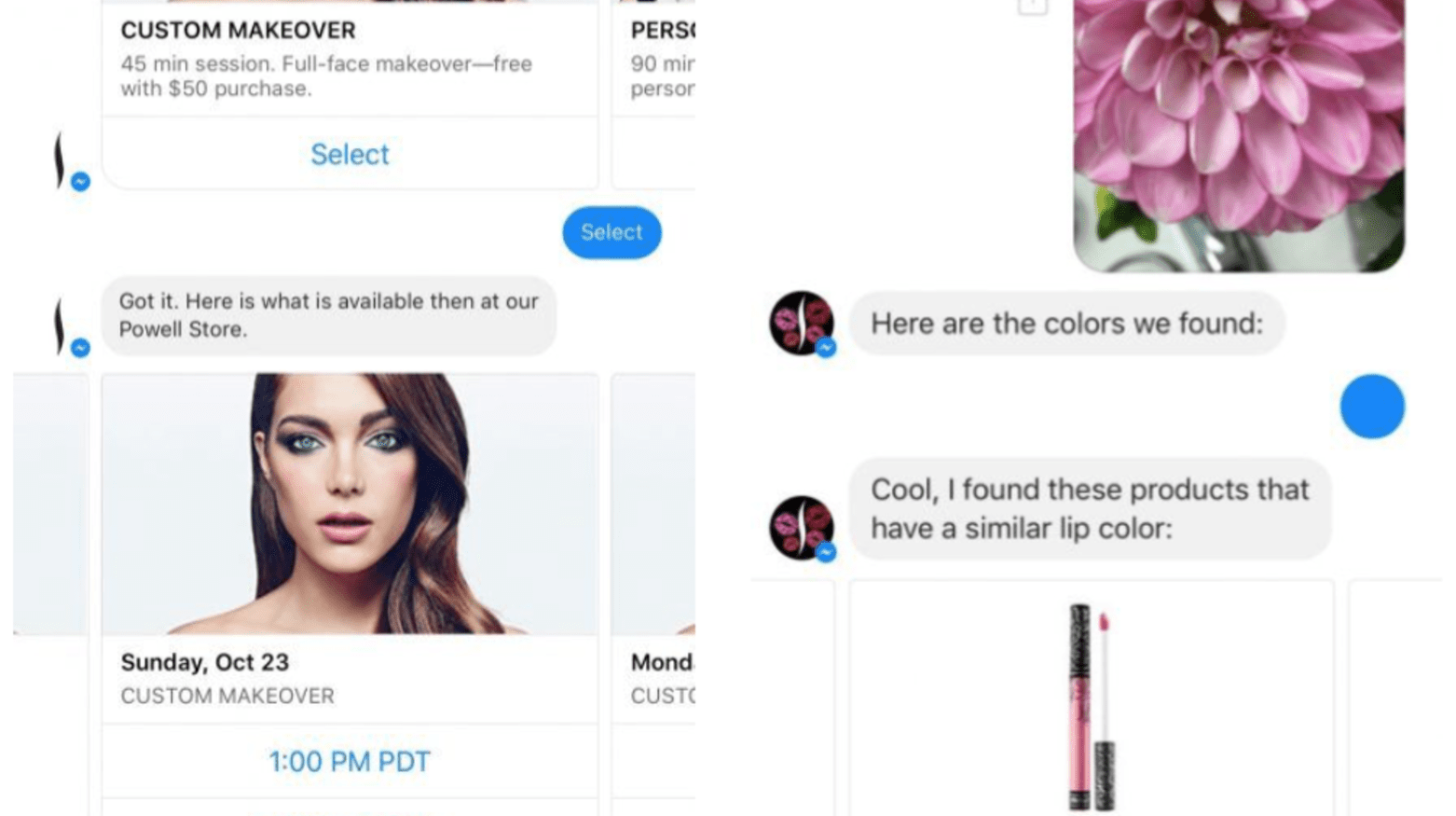
AI chatbots can handle routine inquiries, personalize interactions, and escalate complex issues to human agents. Sephora's Beauty Advisor chatbot handles 30% of support tickets, offering 24/7 assistance and freeing up human agents for complex customer interactions.
Marketing
ML algorithms personalize marketing campaigns based on customer behavior and preferences. Netflix leverages AI to recommend movies and shows based on viewing history, driving a more engaging user experience. Personalized marketing campaigns can increase click-through rates by 7.6%, as shown in a Forrester report.

Finance
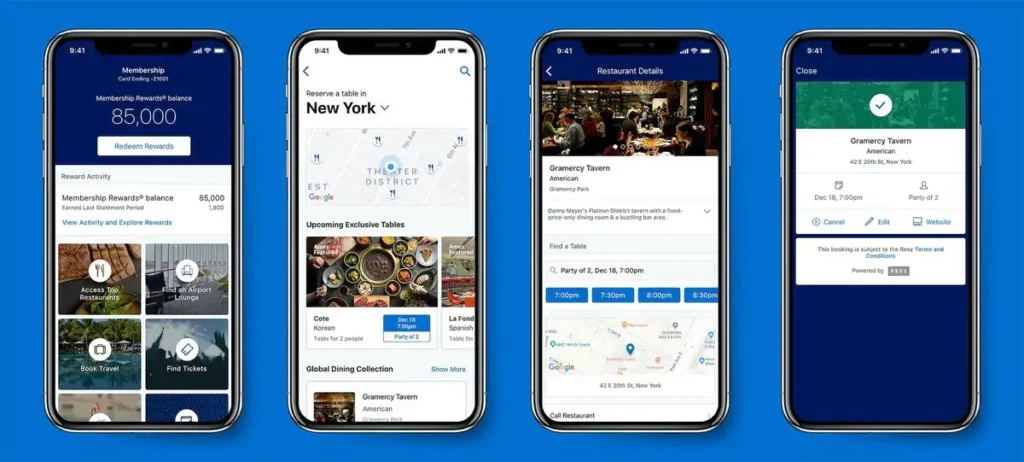
AI can analyze financial data to detect fraud attempts in real-time, prevent losses, and streamline the loan approval process. American Express uses AI to identify fraudulent transactions with high accuracy, protecting customers and preventing significant financial losses.
Supply Chain Management
ML algorithms can optimize logistics networks, predict delivery delays, and ensure on-time product availability. Walmart utilizes AI to optimize its vast supply chain, ensuring products are delivered to stores efficiently and on time.

As Oleksandr Trofimov, Chief Technology Officer at unicrew, points out, "AI and ML are no longer optional; they are essential components of modern enterprise apps." Businesses that embrace this integration unlock a significant competitive advantage through operational efficiency and data-driven insight.
Low-Code/No-Code Development: Empowering Citizen Developers
Waiting months for the IT department to build an internal application is a familiar frustration in large organizations. Low-code/no-code platforms address this directly. The low-code platform market is projected to reach $187 billion by 2030. Think of them as modular toolkits that empower business users (citizen developers) to create and customize applications with minimal coding required.
Here is why this trend matters:
- Faster Development Cycles: Traditional app development can take months. With low-code/no-code, that timeframe can be reduced by up to 75%. Citizen developers configure pre-built features, getting applications running in a fraction of the time.
- Cost Savings: Building custom software is expensive. Low-code/no-code platforms offer a cost-effective alternative, allowing organizations to leverage the skills of their existing workforce rather than scaling up engineering headcount for every internal tool.
- Operational Agility: With low-code/no-code, teams can quickly adapt applications to meet changing business needs. Adding a new feature or adjusting a workflow no longer requires a formal development ticket and a multi-week queue.
Consider where your teams encounter recurring friction. Could a low-code application streamline a reporting process, improve cross-department communication, or automate a repetitive data entry task? The opportunities are usually more numerous than organizations initially expect.
Yaroslav Havryliv, Engineering Director at unicrew, puts it clearly: "Low-code/no-code platforms democratize app development, allowing business users to take an active role in creating solutions that meet their specific needs without relying heavily on IT resources."
Enhanced Security Measures
The Verizon Data Breach Investigations Report found that 82% of breaches involved a human element, highlighting the need for security measures that go well beyond technical controls alone.
Here is how enterprise app developers are responding, with real-world examples:
1. Zero Trust: Least-Privilege Access at Every Layer
Zero-trust security means no user, device, or system is trusted by default, regardless of whether it sits inside or outside the network perimeter. Access is granted only to specific resources based on verified identity and role. A healthcare provider implementing zero trust for its clinical application, for example, gives doctors access only to patient charts relevant to their assigned cases, while nurses access a separate dataset. This limits the damage if a single account is compromised.
2. Encryption: Protecting Data at Rest and in Transit
Encryption converts data into an unreadable format that only authorized parties can decrypt. A financial services firm encrypting all customer data, including credit card and social security numbers, both at rest and in transit adds a critical layer of protection. Even if attackers intercept data packets, the encrypted content is unusable without the decryption key.
3. Biometric Authentication: Moving Beyond Passwords
Biometric authentication uses unique physical characteristics such as fingerprints, facial features, or iris scans to verify identity. A retail company implementing fingerprint scanners for its employee login system eliminates the risks associated with password reuse and phishing, while streamlining access across thousands of employees at multiple locations.
How Cloud-Native Applications Are Reshaping Enterprise Development
Enterprises are moving away from monolithic, on-premise applications toward cloud-native development built on microservices architecture, containerization, and CI/CD pipelines. This shift is one of the most consequential enterprise application development trends of the current cycle.
What Is Cloud-Native Development?
Cloud-native applications are designed from the ground up to leverage the advantages of cloud computing. The key components:
- Microservices Architecture: A complex application is broken into smaller, independent modules. Each microservice performs a specific function and communicates with others through APIs. This modularity allows for faster development, easier maintenance, and independent scaling of individual components.
- Containerization: Containers are lightweight, self-contained units that package an application with all its dependencies. This enables consistent, portable deployments across different cloud environments.
- CI/CD Pipelines: Continuous integration and continuous delivery pipelines automate the software development lifecycle. Code changes are integrated, tested, and deployed automatically, enabling faster release cycles and reduced time-to-market.
Cloud-Native Market Growth
According to MarketsandMarkets, the global cloud-native applications market is projected to reach USD 17.0 billion by 2028, growing at a CAGR of 23.7%. This growth reflects the clear operational advantages cloud-native architectures deliver.
Andriy Burda, Senior Engineering Manager at unicrew, describes the practical impact: "Cloud-native applications offer unparalleled scalability and resilience, enabling businesses to adapt quickly to changing market demands and reduce infrastructure costs."
Here are the key advantages driving adoption:
- Unmatched Scalability
Cloud-native applications scale up or down based on demand, handling fluctuating user traffic without performance degradation.
Advice: Architect using microservices and containerization to allow independent scaling of components. Leverage your cloud provider's autoscaling features to automate this process. - Enhanced Flexibility
Microservices architecture allows for independent development and deployment of individual functionalities, enabling teams to modify or replace services without affecting the entire application.
Advice: Define small, well-scoped microservices with clear APIs. Embrace a DevOps culture to foster collaboration between development and operations teams for faster, more reliable deployments. - Improved Cost-Effectiveness
Cloud-native applications eliminate expensive upfront hardware investments. Organizations pay only for the resources they consume.
Advice: Use pay-as-you-go pricing models to optimize resource consumption. Consider serverless functions for short-lived or unpredictable workloads. Managed services can further offload infrastructure management overhead. - Faster Time-to-Market
CI/CD pipelines automate repetitive tasks and accelerate development lifecycles, getting new features to users faster.
Advice: Invest in automating your build, test, and deployment processes. Use infrastructure as code (IaC) tools to provision cloud resources consistently. A strong CI/CD culture enables frequent, low-risk releases.
Progressive Web Apps: Driving Mobile Engagement
Progressive web apps (PWAs) bridge the gap between websites and native apps. They use web technologies while offering features traditionally associated with native apps, including push notifications and home screen installation. For enterprise application development, PWAs offer a practical path to broader reach and lower maintenance overhead.
Why PWAs Are Gaining Enterprise Adoption
For Users:
- App-like experience without downloading: PWAs work instantly from the browser, offering a familiar app feel without requiring storage space or app store installation.
- Fast performance and offline access: PWAs are designed for speed, even on slower connections. They can also function offline, allowing users to access features and content without an internet connection.
- Always up-to-date: PWAs update automatically in the background, ensuring users always have the latest version without manual update prompts.
For Businesses:
- Wider reach: PWAs do not require app store approval, making them accessible to anyone with a web browser and avoiding the discoverability challenges of crowded app stores.
- Cost-effective development: A single PWA is typically cheaper to develop and maintain than separate native apps for different platforms. Updates roll out automatically, reducing maintenance overhead.
- Increased engagement: Push notifications and home screen installation keep users connected with the application, encouraging return visits and ongoing engagement.
PWAs offer a practical balance: users get a convenient, app-like experience without the download friction, and businesses benefit from wider reach and lower ongoing costs. As mobile usage continues to grow, the role of PWAs in enterprise development will only expand.
Real-World Results: Pinterest, Alibaba, Starbucks
Here is how major companies have leveraged PWAs to improve user experience:
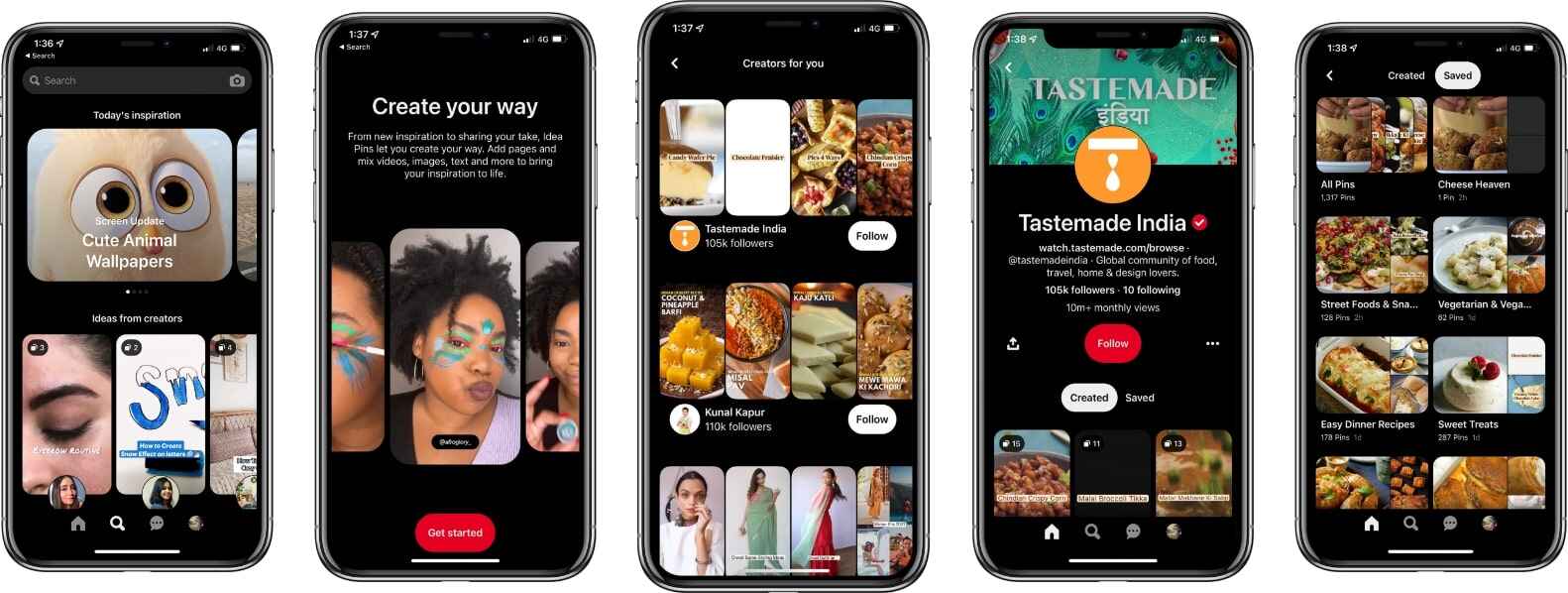
Pinterest's PWA
Facing a slow mobile website with low conversion rates (only 1% of visitors signing up or installing the app), Pinterest launched a PWA within three months. The results were significant:
- Deeper Engagement: Users spent 40% more time browsing Pinterest's PWA than on the old mobile website.
- Increased User Activity: User engagement with Pinterest's platform jumped by 60%.
- Boosted Revenue: Ad revenue rates for Pinterest saw a 44% increase.
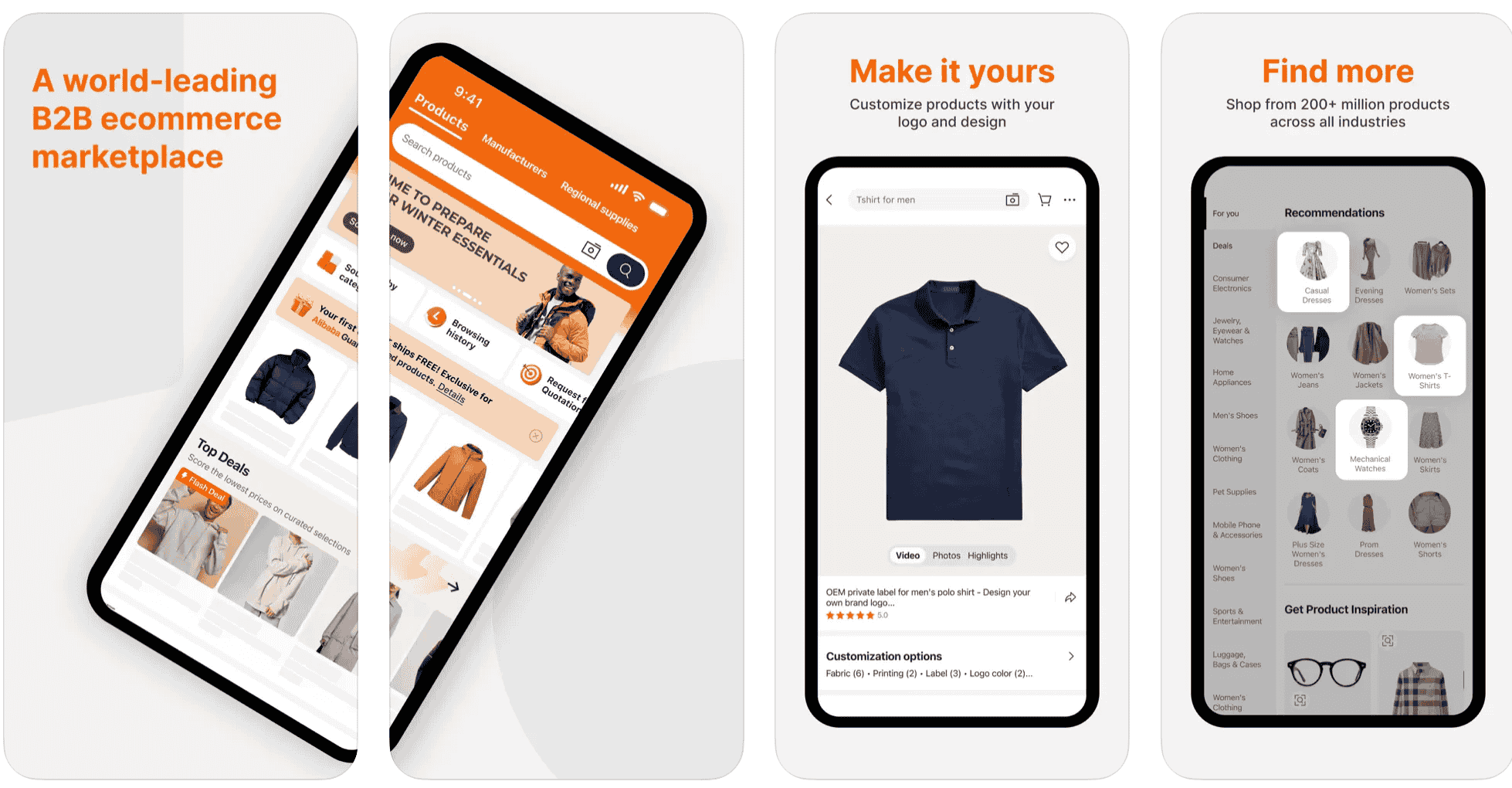
Alibaba's PWA
Alibaba's research revealed users preferred the mobile browser over installing an app. Their PWA strategy delivered strong results:
- Conversion Surge: Mobile web conversions increased by 76%.
- Increased Activity: Active users on iOS and Android grew by 14% and 30%, respectively.
- Top Contender: Alibaba's PWA accumulated 98.3 million total visits and ranked among the top 20 US e-commerce apps without a native app presence.
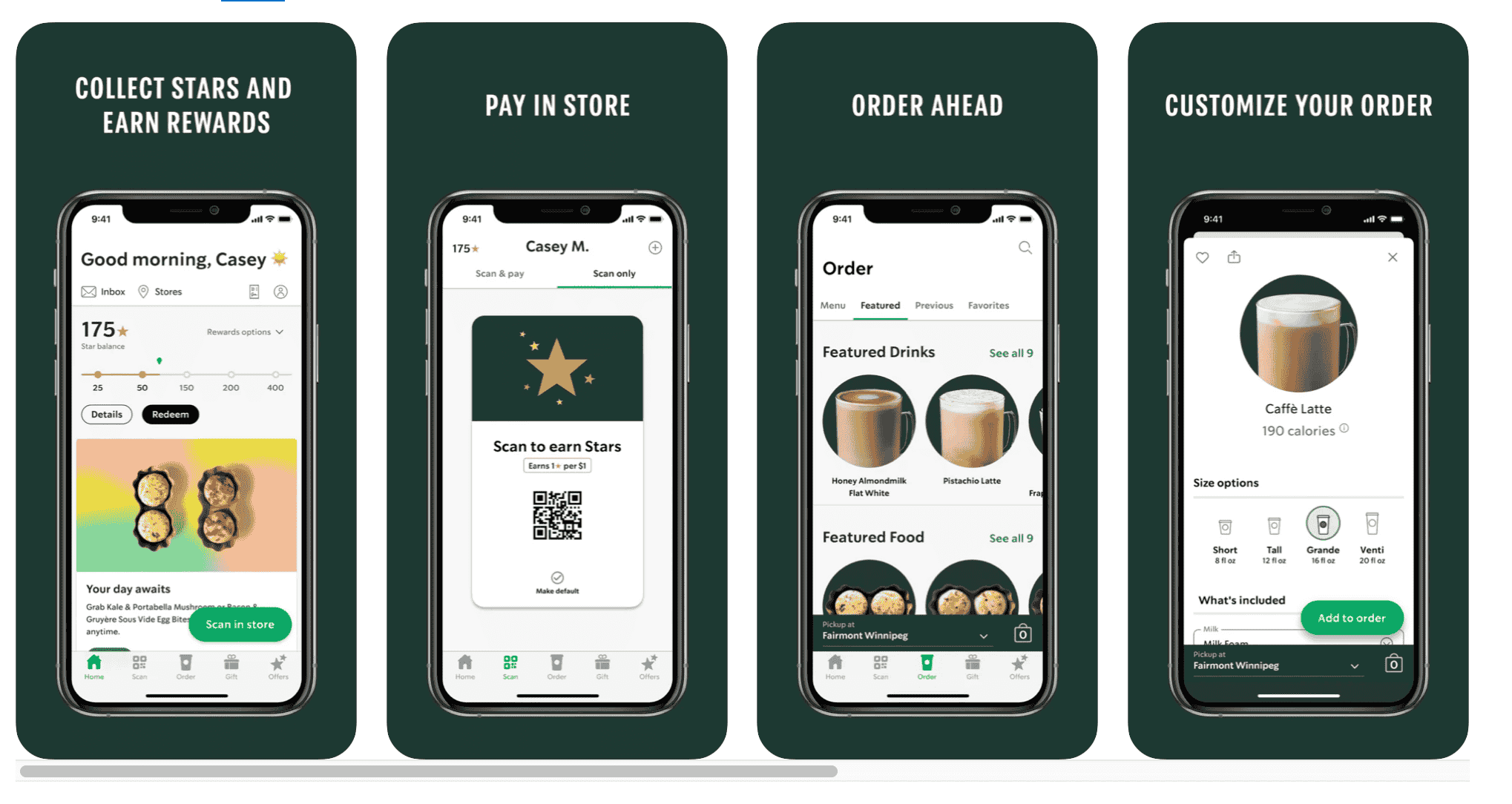
Starbucks PWA
Starbucks built a PWA that prioritized speed and offline capability. Users could browse menus, check nutritional information, and customize orders without an internet connection. The results:
- Doubled Daily Active Users: Starbucks saw a significant boost in daily active users after launching the PWA.
- Increased Order Diversity: Order variety increased by 23%, indicating customers were exploring new menu options through the improved interface.
PWA Limitations Worth Considering
PWAs are a powerful tool, but they are not a universal solution. Before committing, consider these constraints:
- Limited Functionality: PWAs cannot fully replicate complex native app functionality, particularly applications requiring deep access to device hardware such as GPS or Bluetooth.
- App Store Visibility: Unlike native apps discoverable in app stores, PWAs rely on solid SEO strategies for users to find them.
- Compatibility: Although compatibility improves, limitations may still exist on older devices or with less common browsers.
"If you prioritize fast loading times, offline functionality, and a wider reach, a PWA could be the right fit. However, if your app requires complex functionalities or relies heavily on device hardware, a native app might be the better choice," adds Oleksandr Trofimov, Chief Technology Officer at unicrew.
IoT Integration: Connecting Your Enterprise Ecosystem
The Internet of Things (IoT) connects physical devices to your digital systems, enabling real-time data collection, automated responses, and new operational capabilities. But isolated sensors alone do not create business value. What matters is how you connect these devices to your existing enterprise applications, including CRM, ERP, and operational platforms.
When IoT is integrated effectively with enterprise applications, organizations gain:
- Real-Time Operational Insight: IoT sensors continuously collect data on equipment health, environmental conditions, usage patterns, and more. Integrated with enterprise applications, this data supports faster, more informed decisions across the organization.
- Improved Efficiency: Connected logistics enables precise routing based on live traffic data, reducing delivery times and cutting operational costs.
- Better Customer Outcomes: IoT data enables proactive service delivery. In healthcare, remote patient monitoring allows clinicians to intervene earlier, improving outcomes and reducing costly hospital readmissions.
Here is how different industries are applying IoT integration:
- Manufacturing
Predictive maintenance through IoT sensors identifies potential equipment issues before they cause costly downtime. This enables proactive repairs and smoother production operations.
Advice: Start by instrumenting your highest-criticality equipment. Feed sensor data into your production management system to establish baseline performance patterns, then build alerts for meaningful deviations. - Healthcare
IoT devices monitor vital signs remotely, enabling healthcare providers to intervene early in the event of complications. This improves patient outcomes and reduces the need for costly hospital readmissions.
Advice: Prioritize HIPAA-compliant data handling and end-to-end encryption for any IoT implementation in healthcare. Patient data security is non-negotiable. - Logistics
Real-time tracking of packages, vehicles, and inventory enables faster deliveries, optimized routes, and improved storage condition monitoring.
Advice: Integrate IoT tracking data directly into your dispatch and customer communication systems. Visibility into shipment status, accessible to both operators and customers, reduces support volume and improves satisfaction.
Oleksandr Trofimov, Chief Technology Officer at unicrew, summarizes the business case: "IoT integration allows businesses to collect real-time data from various devices, leading to improved operational efficiency and the creation of new business models." For organizations ready to move beyond manual data collection, IoT integration with enterprise applications is one of the highest-leverage investments available.
Conclusion
In 2026, these six enterprise application development trends are not emerging concepts on a horizon. They are active investments being made by organizations across industries. AI and ML, cloud-native architecture, enhanced security, low-code platforms, PWAs, and IoT integration each address real operational challenges and competitive pressures. Organizations that understand them and act on them will build better software, faster, with lower maintenance overhead.
At unicrew, we help clients navigate these shifts and achieve their strategic goals through tailored application development solutions.
Discover how we assist enterprises in their app development
Frequently asked questions
The six most significant enterprise application development trends in 2026 are AI and machine learning integration, low-code/no-code development, zero-trust security architecture, cloud-native development (microservices, containerization, CI/CD), progressive web apps, and IoT integration. Each addresses a distinct operational challenge: speed, security, scalability, cost, or customer experience.
AI is used in enterprise applications for advanced analytics (pattern detection in large datasets), predictive insights (forecasting equipment failures or demand shifts), automated decision-making (fraud detection, routing, approvals), and personalization (recommendation engines, chatbots). The most impactful implementations connect AI outputs directly to operational workflows rather than treating AI as a separate reporting layer.
Cloud-native enterprise application development means building applications specifically designed to run in cloud environments, using microservices architecture, containerization (Docker, Kubernetes), and CI/CD pipelines. Unlike traditional monolithic applications migrated to the cloud, cloud-native apps are architected from the start to take full advantage of cloud scalability, flexibility, and managed services.
Choose a PWA when broad reach, fast load times, offline functionality, and lower development cost are the primary requirements. Choose a native app when the application needs deep device hardware access (GPS, Bluetooth, camera), requires complex offline functionality, or when app store discoverability is a core acquisition strategy. Many enterprises use both: a PWA for broad customer-facing access and a native app for specialized workflows.